

To connect devices, you need specific authorisation credentials called a network password. This key lets you access shared resources and talk to others on your local network.
This password is also known as a network security key. It connects your router to devices securely. It’s the main guard for your wireless network, letting only approved users in.
These credentials are vital for sharing files, remote access, or joining Wi-Fi. Knowing about them is key for network system users.
The correct authorisation credentials don’t just let you in. They also keep your network safe and sound.
Understanding Network Passwords for Computer Connections
Network passwords are like digital keys that let devices talk to each other. They make sure data moves safely between systems. This keeps your info safe while you work together on different computers.
Definition and Purpose of a Network Password
A network password is a security key that checks if you’re allowed to use shared resources. It stops people who shouldn’t be there from getting to your data or network services.
These passwords make sure only the right devices can talk to each other. They help keep your systems safe and private.
“Network security isn’t about building higher walls—it’s about creating smarter keys that only the right people can use.”
Types of Network Connections Requiring Passwords
Different networks need different ways to check who’s allowed in. Knowing this helps you pick the right security for your needs.
Local Area Network (LAN) Access
LANs need passwords to access shared folders or printers. This LAN password keeps only approved users from seeing or changing shared stuff.
Windows uses SMB protocols for sharing files. Without the right password, you can’t get to the network resources.
Wireless Network Connections
Wireless networks use encryption to stay safe. The Wi-Fi security key is the most common password type for homes and businesses.
Wireless security has gotten better over time with new protocols:
| Protocol | Security Level | Year Introduced |
|---|---|---|
| WEP | Basic | 1999 |
| WPA | Improved | 2003 |
| WPA2 | Strong | 2004 |
| WPA3 | Advanced | 2018 |
Each new protocol makes wireless networks safer against new threats. WPA3 is the strongest encryption now.
Remote Desktop and File Sharing
Remote connections need strong remote access authentication to keep systems safe. These passwords make sure only trusted users can connect remotely.
Sharing files uses SMB protocols that need the right password. This keeps your business and personal files safe from unwanted access.
To network Windows computers well, you need to set up these security steps right. For more help, check out our guide on how to network Windows computers effectively.
Where to Find the Network Password on Your System
Finding your network password is key for safe device connections. This guide helps you find passwords on various platforms and devices.
Locating Passwords in Windows Operating Systems
Windows has several ways to find saved Wi-Fi passwords. The steps are similar across versions, making it easy for most users.
Windows 10 and 11 Network Settings
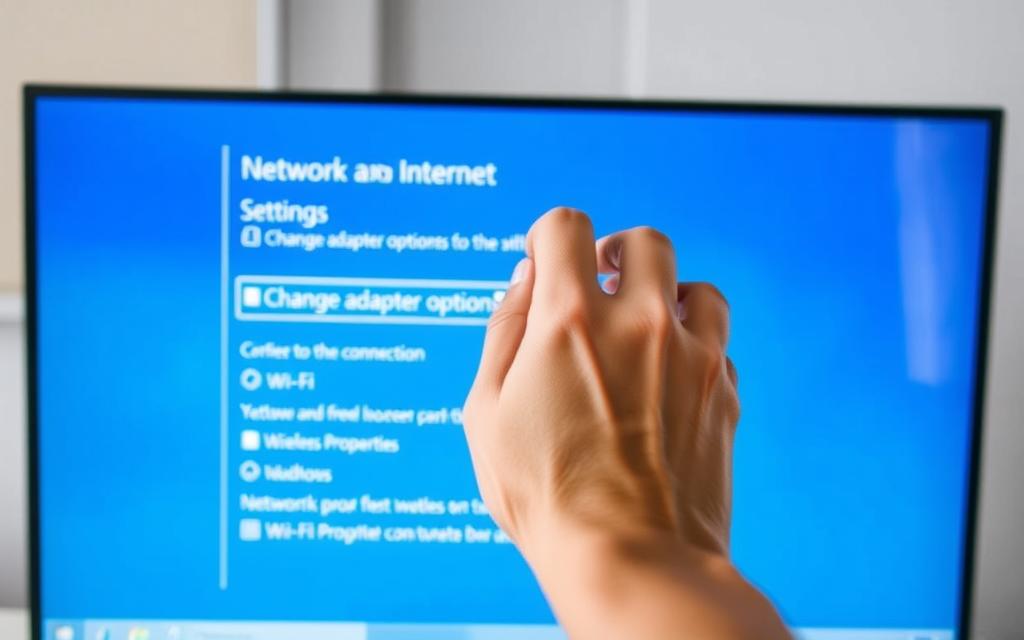
To find your Wi-Fi password, go to Network & Internet settings. You can get there from the Control Panel or system tray icon. Choose your active Wi-Fi connection and click Wireless Properties.
Under the Security tab, check Show characters to see your password. You’ll need admin rights to do this.
Using Command Prompt for Password Retrieval
For tech-savvy users, Command Prompt offers a direct way to find network passwords. Open CMD as an admin and use netsh commands.
It shows all connected networks and their passwords. This works even if you’re not connected.
Finding Passwords on macOS Devices
Apple’s system makes password management easy. macOS keeps network passwords in safe places. You can access them with standard tools.
Keychain Access Utility
Keychain Access is the main password manager. Open it from Utilities and pick System keychains.
Look for your network name in the list. Double-click it to see its properties. Check Show password and enter your macOS login to see it.
System Preferences Network Settings
To find current connections, go to Network in System Preferences. Choose Wi-Fi and click Advanced for network settings.
The wireless tab shows your preferred networks and security info. This makes it easy to find your Mac’s network key.
Router Administration Panel for Network Credentials
If you can’t find your password on devices, check your router. It has the original network details. The admin panel gives you full control over your Wi-Fi.
Use an Ethernet cable to connect directly to the router. Open a web browser and type the default gateway address (usually 192.168.1.1).
Enter the router admin password, often on a sticker. Go to Wireless Settings to see or change your security key.
Most routers show your current password in plain text in security settings. This is the best way to get your original network password.
How to Use the Network Password to Connect to Another Computer
Now that you’ve found your network credentials, it’s time to use them to connect devices securely. This step is different for each operating system but follows the same security rules.
Step-by-Step Guide for Windows to Windows Connection
To link two Windows computers, you need to set things up first. This makes sure your devices are both safe and easy to use.
1. Enable Network Discovery and File Sharing
Start by going to Network and Sharing Center in Control Panel. Click “Change advanced sharing settings” and turn on network discovery and file sharing. For home networks, pick “Turn on network discovery” and also “Turn on file and printer sharing.”
With password-protected sharing on, you’ll need the network password to get in.
2. Enter the Password When Prompted
When you try to access another computer through Network Explorer, Windows will ask for your login details. Type in the username and password of an account on the other machine with the right permissions.
The system will remember these details for next time. But, you might need to log in again after changing passwords or updating systems.
3. Troubleshooting Common Access Issues
Not being able to access might be because of wrong login details or permission settings. Make sure the account is on both computers and has admin rights. Also, check that the other computer’s firewall lets file and printer sharing connections.
It’s also important that both computers are in the same workgroup. Go to System Properties to check this.
Connecting from macOS to Windows or Other Systems
Apple devices use SMB protocols to talk to Windows systems. This makes it easy to share files between different operating systems.
Using SMB Protocols and Authentication
On your Mac, open Finder and go to “Go” from the menu bar. Then, choose “Connect to Server” and type in the Windows computer’s address with smb:// followed by its IP address or name.
When asked, enter the Windows username and password. macOS will use SMB to connect, giving you access to shared folders and resources.
Best Practices for Secure Password Usage
Keeping your network safe is all about strong passwords and good password management. Using strong passwords keeps your systems safe from unwanted access.
Here are some tips for keeping your passwords safe:
- Create passwords with at least 12 characters, including uppercase, lowercase, numbers, and symbols
- Avoid using dictionary words or personal info that’s easy to guess
- Use a password generator for truly random passwords
- Change your network passwords every 90 days for better security
- Never use the same password for different systems or services
Following these strong password best practices helps protect against brute force attacks and unauthorized access.
| Connection Type | Protocol Used | Authentication Method | Common Issues |
|---|---|---|---|
| Windows to Windows | SMB/CIFS | Windows credentials | Workgroup mismatch, firewall blocking |
| macOS to Windows | SMB | Windows credentials | SMB version incompatibility |
| macOS to macOS | AFP | Apple ID/local credentials | Bonjour service discovery issues |
| Mixed environments | SMB | Domain/local credentials | Permission mapping errors |
For successful connections, you need the right technical setup and the correct login details. When you’re having trouble, always check the basics of network connection first.
Troubleshooting Common Network Password Issues
Even with the right login details, network issues can pop up. This part tackles common password problems. It offers solutions to get your devices connected again.
Incorrect Password Errors and Solutions
The frustrating password mismatch error can happen even with the right login. It usually comes from three main reasons: wrong password entry, device compatibility, or router setup issues.
First, check if you’re typing the password correctly. Network passwords are case-sensitive. Make sure Caps Lock is off and type the password again carefully.
If the problem continues, try restarting your devices and router. This simple step can fix temporary issues that stop you from logging in.

If you keep getting password mismatch errors, check if your device supports the network’s security. Older devices might not work with newer encryption types. You might need to change your router’s settings to WPA2.
Network Permissions and Firewall Settings
Even with the right password, security settings can block access. Both Windows Firewall and router settings can cause network permissions errors.
Adjusting Windows Firewall Rules
Windows Firewall might block file and printer sharing. To change these settings, go to Windows Defender Firewall in the Control Panel.
In Windows Defender Firewall, select “Allow an app or feature.” Find “File and Printer Sharing” and check both private and public network boxes. This change often fixes connectivity issues.
To allow specific programs, create custom inbound rules. This lets network traffic while keeping other apps secure.
Configuring Router Settings for Access
Router security settings can also block connections. Log into your router’s admin panel through a web browser using its IP address.
In the router settings, look for network isolation or AP isolation. Disable these if they’re on, as they stop devices on the same network from talking to each other.
Make sure network discovery is turned on in your router’s settings. Some routers have extra security features that might need tweaking for local network access.
Resetting or Changing Network Passwords
If all else fails, or if you think your network is not secure, resetting your passwords is a good idea. This involves getting into your router’s admin panel.
To change your Wi-Fi password, log into your router using its IP address. Go to wireless security settings and update the password field. Use a strong password with letters, numbers, and symbols.
After changing your Wi-Fi password, reconnect all devices with the new password. Write down the new password and keep it safe for later use.
For a full network reset, most routers have a physical reset button. Press and hold it for 10-15 seconds to reset to factory settings. Then, set up your network again from scratch.
| Common Issue | Possible Cause | Recommended Solution |
|---|---|---|
| Password not accepted | Case sensitivity error | Check Caps Lock and retype carefully |
| Devices can’t see each other | Network discovery disabled | Enable network discovery in settings |
| Connection blocked | Firewall restrictions | Adjust Windows firewall configuration rules |
| Intermittent connectivity | Router security settings | Disable AP isolation in router settings |
| Persistent access issues | Compromised credentials | Change Wi-Fi password completely |
Remember, troubleshooting networks takes patience and careful testing. Tackle one problem at a time, checking connectivity after each change to find the exact cause of your network issues.
Conclusion
Network passwords are key to linking your devices securely. They allow access to shared resources across different platforms. Knowing how to use them is vital for reliable access.
This guide has given you all the info you need. You now know what network passwords are and how to find them on Windows, macOS, and routers. You’ve also learned how to connect devices and fix common problems.
Keeping your network safe depends on good password practices and solving problems effectively. Always update your passwords and security regularly. This keeps your network safe.
Good network management is the heart of digital security at home and work. Use strong, unique passwords and stick to security rules. This keeps your data safe from hackers.
Keep using these tips to keep your network strong and efficient. Share this knowledge with your team. It will help everyone stay safe online.
FAQ
What is a network password and why is it important?
A network password, or security key, is key to connecting devices on a network. It lets you share files securely and access Wi-Fi networks. Only those with the right password can join, keeping your data safe.
What types of network connections require a password?
Many network connections need a password. This includes LAN access, Wi-Fi connections, and Remote Desktop sessions. It also applies to shared file access via SMB.
How can I find my saved Wi-Fi password on Windows?
On Windows 10 or 11, find your Wi-Fi password in the Network and Sharing Centre. Or, use Command Prompt with netsh wlan show profile name="NetworkName" key=clear to see the security key.
Where do I find the network password on a macOS device?
On macOS, use Keychain Access in Utilities. Search for your Wi-Fi network, double-click it, and check “Show password” after authenticating. You can also check Network Settings in System Preferences.
How do I access my router’s administration panel to find or change the network password?
To access your router’s admin panel, enter its IP address in a web browser. Log in with your admin credentials, usually found on the router. Then, go to Wireless Settings to view or change the password.
What are the steps to connect two Windows PCs using a network password?
Enable Network Discovery and File Sharing on both PCs. When connecting, enter the network password. Make sure both PCs are on the same network and troubleshoot any access issues.
How do I connect from a macOS device to a Windows system or another Mac?
Use the SMB protocol by entering smb://[IP_address_or_hostname] in Finder’s Connect to Server. Authenticate with the correct username and password. Ensure both devices have sharing settings enabled.
What are the best practices for creating and using a secure network password?
Make a strong, unique password with letters, numbers, and symbols. Avoid common phrases. Change it often and never share it to keep your network safe.
What should I do if I receive an “incorrect password” error when trying to connect?
Check that you’ve entered the password correctly, paying attention to case. Make sure there are no typos and use the latest password. If problems continue, reset the password via your router’s admin panel or re-enter it carefully.
How can network permissions or firewall settings block access even with the correct password?
Firewall settings on Windows or your router might block connections. Adjust Windows Firewall rules for file and printer sharing. Check your router’s settings for access controls. Set network profiles to Private or Home for less restrictive sharing.
How do I reset or change my network password to resolve access issues?
Log into your router’s admin panel, go to Wireless Security, and enter a new password. Save changes and reconnect all devices with the new password. This can solve access problems and boost security.

 By
By